TV Setup Mistakes and Accessory Fixes
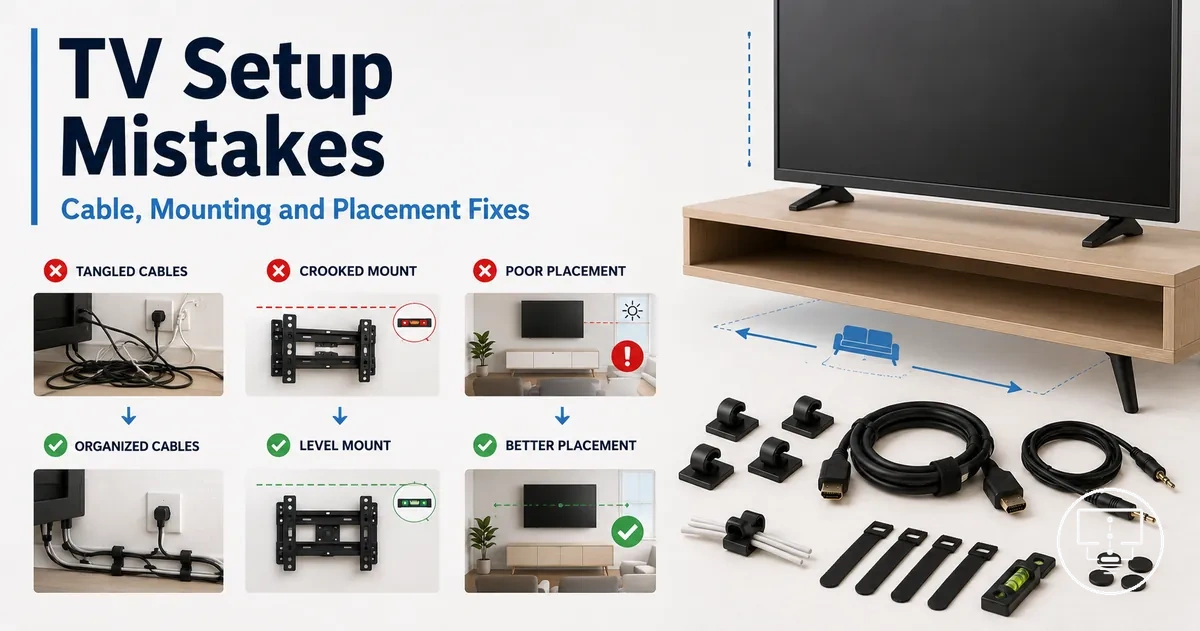
TV setup mistakes are setup conditions where the TV may work, but the surrounding cables, placement, mounting, power, stability, or control path creates a visible or practical problem. Accessory fixes can reduce these issues when the accessory role matches the mistake, the fit condition is correct, and the correction limit is realistic for cable management, HDMI port access, wall mount clearance, power protection, or remote control use.
A setup problem often starts as cable clutter, a strained connection, poor viewing position, weak mounting clearance, exposed power routing, unstable furniture, or mismatched control access. The right TV setup accessories may help by organizing routing, improving physical access, supporting placement, protecting power points, or restoring everyday control. The same symptom can also point to a wrong installation choice, an electrical concern, damaged hardware, or a TV fault, so accessory fixes should stay separate from repair work, unsafe installation changes, or electrical judgement.
For example, visible wires below a wall-mounted TV may need a cable cover, cable sleeve, shorter route, or better access behind the furniture. A blocked HDMI port may need a fit check before a right-angle adapter is useful. A high wall mount, unstable TV stand, missing power protection, or lost remote control each needs a different diagnostic path, so this page groups the mistakes by cable, connection, mounting, placement, power, stability, and control conditions.
This troubleshooting guide stays limited to accessory-fixable TV setup mistakes, not broad TV repair. If the problem involves damaged cords, unsafe wall fixing, overloaded power points, unstable furniture, persistent device failure, or uncertainty about safe installation, the next action may need professional help instead of another accessory.
Setup mistakes that accessories can realistically correct
Setup mistakes that accessories can realistically correct are problems where the TV setup functions, but a missing, unsuitable, or poorly matched accessory creates a limitation in the setup area. These TV setup mistakes are often accessory-fixable when the accessory role matches the symptom, the fit condition is verified, and the correction limit is understood. This section uses a diagnostic frame that separates accessory correction from problems that require installation changes, repair, or deeper compatibility checks.
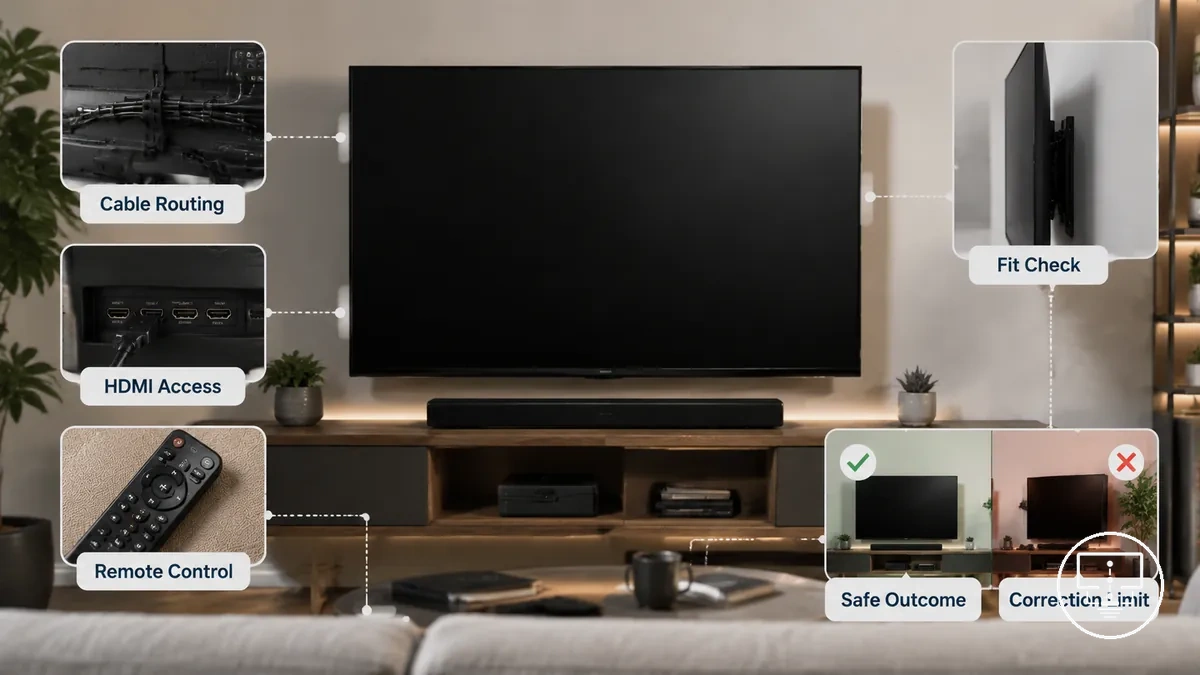
A cable routing issue may improve with cable management accessories, while limited HDMI port access may improve with an adapter that suits the available space and connection path. A setup problem linked to stability, access, or control convenience can sometimes be reduced by a matching accessory. Problems caused by damaged hardware, unsafe installation, or broader compatibility conflicts may require a different response. The distinction depends on the setup area, fit condition, and correction limit.
The comparison below organizes Setup mistakes that accessories can realistically correct by mistake type, setup area, accessory role, fit condition, and correction limit. Before acting, readers can use the accessory checklist to verify symptoms, complete a fit check, and identify a safe outcome.
| Mistake Type | Setup Area | Likely Accessory Role | Required Fit Condition | Correction Limit |
|---|---|---|---|---|
| Cable clutter | Cable routing and visibility | Cable management support | Suitable routing path and cable access | May improve organization but not relocate equipment |
| Restricted HDMI access | Connection area | Access or clearance support | Port layout and connector compatibility | May improve access but not repair a damaged HDMI port |
| Control inconvenience | Remote control use | Control or access support | Device compatibility and correct setup | May improve operation but not correct hardware faults |
| Minor placement limitation | Viewing position or equipment location | Positioning support | Compatible size, weight, and placement conditions | May improve usability but not replace proper installation |
A single symptom can have different causes. For example, a loose connection may result from poor setup, an incompatible accessory, or incorrect installation. A safety check and compatibility review can help determine whether the condition is accessory-fixable or whether a setup change is the safer next action.
Cable clutter and routing mistakes
When cable clutter makes TV cables difficult to see, reach, trace, or access, the cause is often a cable routing mistake rather than a TV fault. Cable management accessories may improve organization when the cable route, cable length, and access requirements are understood first. The diagnostic frame is to separate visible clutter from problems involving strain risk, heat exposure, bend pressure, or limited access.
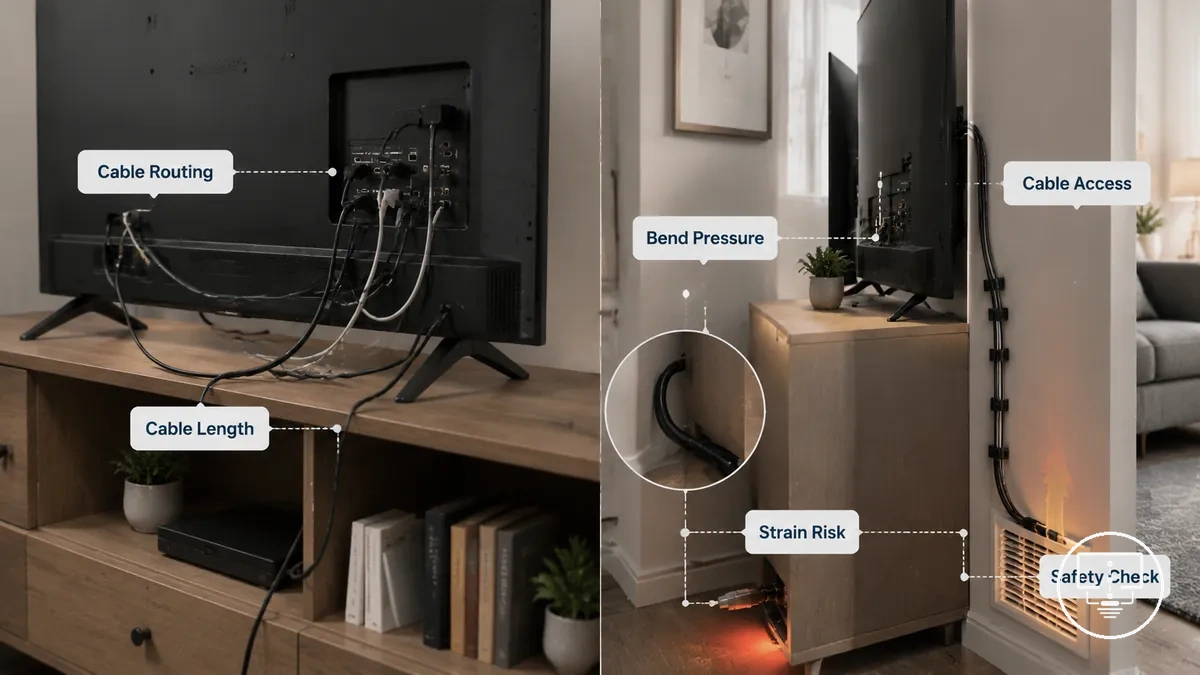
Cable routing depends on visibility, reach, bend pressure, separation, and access. A cable may appear messy because it lacks cable covers, clips, sleeves, or ties, while another cable may be stretched because the cable length is too short for the route. A furniture route may reduce visibility in one setup, while a wall route may improve access in another. The correct correction depends on the route condition and the boundary between organization and safe cable placement.
The checklist below helps diagnose cable clutter and routing mistakes before choosing a correction. Use the observations to connect symptoms with cable management accessories, fit checks, and safe next actions.
- Visible loose cables: check whether cable covers, clips, sleeves, or ties could improve cable routing and visibility.
- Stretched cables: check cable length, reach, slack, and strain risk before adding routing accessories.
- Sharp bends behind furniture: check for bend pressure that may limit cable access or create routing difficulties.
- Cables trapped behind equipment: check whether the furniture route allows safe access for future changes.
- Cables near warm equipment areas: perform a safety check and review the route before focusing on appearance.
- Hard-to-trace connections: check whether grouping or separating cables would improve identification and access.
Messy visible cables and stretched cables may look similar from a distance, but the correction is often different. Cable management accessories may help organize loose cables, while stretched, pinched, overheated, or inaccessible cables may require route changes, different cable length, or further installation guidance before any accessory-based fix is considered.
Visible wires below wall-mounted TVs
When visible wires hang below a wall-mounted TV, the cause is often a cable route that leaves cables exposed, unsupported, or longer than needed for the available path. The local problem usually involves exposed cable drops, missing cable cover placement, or a setup condition that increases visibility.
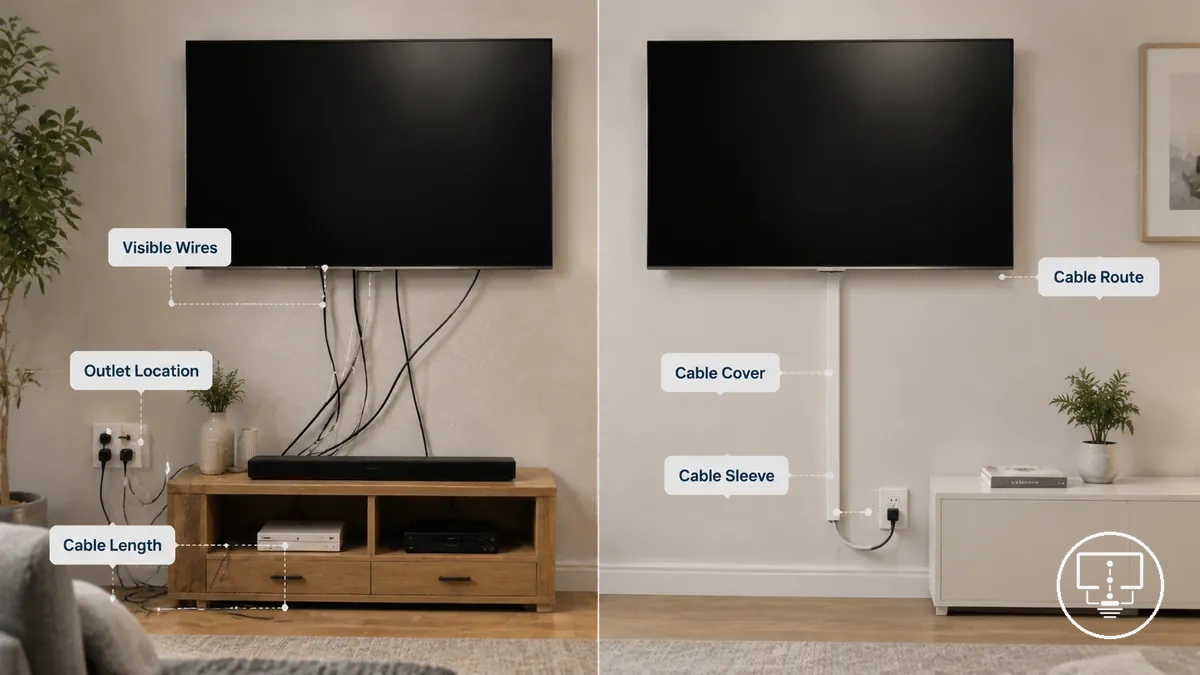
Visible wires can be influenced by cable cover position, cable sleeve use, outlet location, furniture gap, cable length, bend pressure, and strain. A cable route that lacks separation or support may leave power cables and signal cables more noticeable and harder to manage. Cable management accessories may reduce visibility in suitable conditions, but the correction limit depends on cable type, access, outlet location, and local safety rules.
The checks below help distinguish common causes of visible wires below wall-mounted TVs and what may change the visibility outcome.
- Before: Exposed cable drop below the screen. After: A cable cover may reduce visibility when the route allows suitable placement.
- Before: Loose grouped cables hanging below furniture. After: A cable sleeve may improve organization and reduce visual clutter.
- Before: Excess cable length creating visible loops. After: Better cable routing may reduce unnecessary slack.
- Before: Tight routing that creates bend pressure or strain. After: Route adjustments may improve access while reducing cable stress.
- Before: A distant outlet location leaves cables exposed. After: Visibility may improve when the cable route better matches the available path and furniture gap.
Poor cable length, bundling, and separation
When cables become difficult to trace, access, or manage, poor cable length, bundling, and separation are often the cause. Excess slack, tight cable runs, or mixed cable groups can create tangles, bend pressure, strain, visible wires, and diagnostic confusion, especially when multiple devices share the same cable route.
Cable length, bend radius, heat exposure, and separation affect cable behavior. An HDMI cable with excess slack may become tangled with device cables, while a power cable bundled tightly with other cables may reduce access during troubleshooting. Antenna, optical, and device cables can become harder to identify when separation is poor. Cable covers or a cable sleeve may improve organization and visibility, but better separation alone may not resolve every signal or picture issue. The correction limit depends on the cable condition, outlet location, cable route, and overall setup.
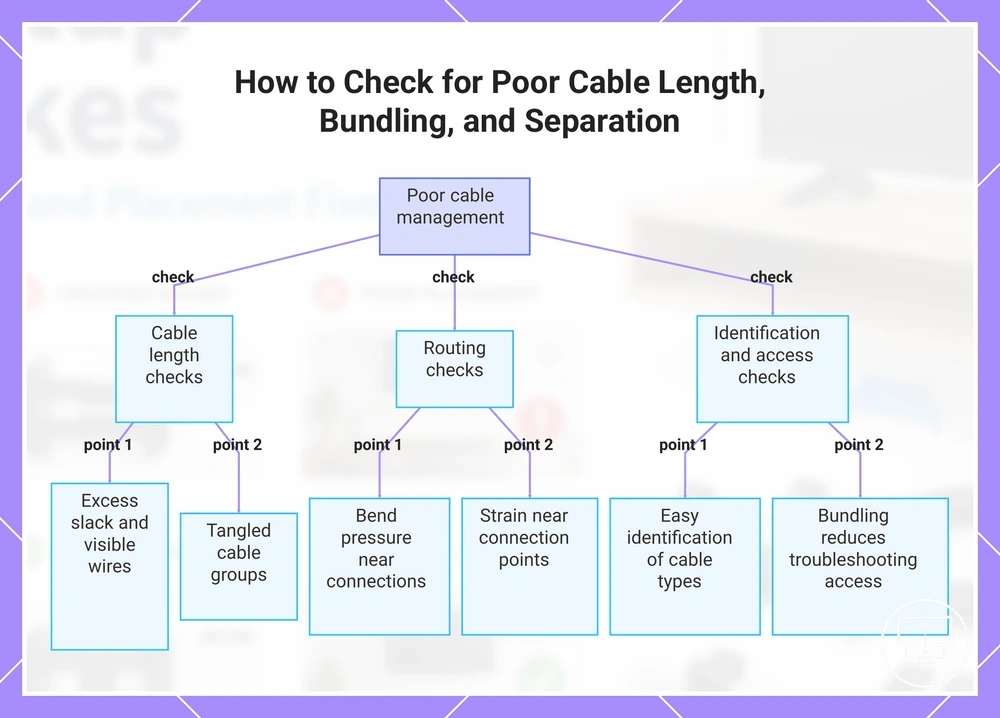
The checklist below helps verify how poor cable length, bundling, and separation affect access, routing pressure, and cable identification.
- Check whether cable length creates excess slack, visible wires, or tangled cable groups.
- Check whether tight routing creates bend pressure or strain near connection points.
- Check whether HDMI, antenna, optical, or device cables remain easy to identify and access.
- Check whether power cables and signal cables are bundled in a way that reduces access during troubleshooting.
- Check whether cable covers or a cable sleeve improve organization without increasing routing pressure.
- Check whether the cable route allows access without pulling, stretching, or compressing cables.
This chart shows the main checks to verify poor cable length, bundling, and separation issues affecting access, routing pressure, and cable identification.
HDMI cable, port, and adapter mistakes
When an HDMI connection does not behave as expected, the cause is often a setup error involving the HDMI cable, HDMI port, adapter fit, or connected-device requirement rather than a fault with the TV or device. HDMI outcomes depend on cable capability, port label, physical access, and the feature requirements of the connected device. The safest diagnostic approach is to separate wrong cable, wrong port, poor access, and feature-limit conditions before replacing equipment.
An HDMI cable may connect physically while still failing to support a required feature if cable capability does not match the connected-device requirement. An HDMI port label can also affect the outcome when a feature depends on a specific port, including ARC or eARC use cases. A right angle HDMI adapter is primarily a clearance and access accessory that may reduce cable strain and connector stress when space behind the TV is limited. The key criterion is whether the cable, port, adapter fit, and device requirement align with each other.
The table below helps diagnose HDMI cable, port, and adapter mistakes by separating cable capability, port choice, adapter angle, and device requirement. Use these checks to connect symptoms with likely causes before making changes, and perform compatibility checks before assuming an accessory correction is appropriate.
| Observed Symptom | Likely Condition | What to Verify | Safe Next Action |
|---|---|---|---|
| Feature does not operate as expected | HDMI cable capability may not match the connected device | Cable capability and device requirement | Verify cable suitability before replacing devices |
| Connection works on one port but not another feature path | Wrong HDMI port selection | HDMI port label, ARC, or eARC assignment | Check port-specific requirements |
| Connector is difficult to install behind the TV | Poor physical access | Wall clearance and connector position | Assess whether a right angle HDMI adapter improves fit |
| Loose or stressed cable position | Cable strain near the connector | Cable route and bend pressure | Reduce connector stress and review cable routing |
Wrong HDMI cable for the connected device
A wrong HDMI cable may limit features when the connected device requires higher cable capability than the cable can provide. Compatibility depends on the relationship between the HDMI cable, HDMI port, cable rating, and device requirement, creating a feature limit when those elements do not align.
TV port capability, port label, and device settings can influence the outcome. A port label may identify a specific HDMI port for ARC or eARC functions, while cable rating can affect whether a connected device supports its intended resolution or refresh-rate features. A right-angle adapter may improve clearance and reduce connector stress when cable stiffness creates access issues, but it does not change cable capability. Any correction depends on the device requirement, TV model, port configuration, and feature settings involved.
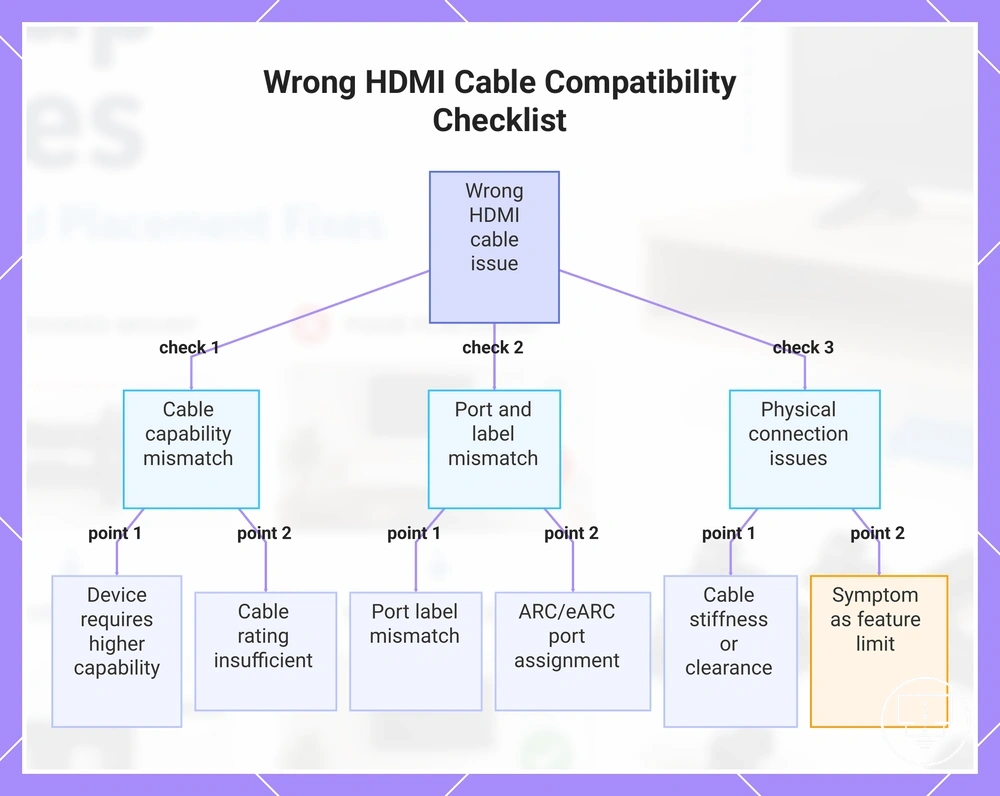
The checklist below helps verify whether a wrong HDMI cable for the connected device is creating a compatibility limitation.
- Check whether the connected device requires features that depend on higher HDMI cable capability.
- Check whether the HDMI port and port label match the intended device connection.
- Check whether the cable rating aligns with the device requirement and TV port capability.
- Check whether the expected resolution or refresh-rate setting exceeds the cable capability available in the setup.
- Check whether ARC or eARC functions depend on a specific HDMI port assignment.
- Check whether cable stiffness, limited clearance, or connector stress is affecting the connection path.
- Check whether the symptom appears as a feature limit, wrong input condition, or intermittent connection behavior.
This chart shows the main checks to verify whether a wrong HDMI cable is causing a compatibility limitation.
Wrong HDMI port or strained port access
When a feature is missing or an HDMI connection feels difficult to access, the cause may be the wrong HDMI port, a port-label mismatch, cable rating mismatch, or physical pressure on the connector. This setup problem often appears when the HDMI cable, HDMI port, and device requirement do not align, or when limited clearance creates connector stress.
A port label may identify a specific HDMI port for ARC, eARC, or another device requirement, creating a feature limit when the connection uses the wrong input. Physical access can also affect reliability when cable stiffness, wall clearance, or cable direction places pressure on the connector. A right-angle adapter may improve fit and access by changing adapter orientation, but its role is physical clearance rather than signal improvement. Any correction depends on the port assignment, cable path, and available space around the connection.
The checklist below helps verify whether wrong HDMI port or strained port access is causing a feature mismatch or physical access problem.
- Check whether the HDMI port and port label match the intended device requirement.
- Check whether ARC or eARC functions depend on a specific HDMI port assignment.
- Check whether the selected input matches the connected device.
- Check whether wall clearance limits cable movement behind the TV.
- Check whether cable stiffness creates pressure on the connector or cable route.
- Check whether right-angle adapter orientation improves physical fit without increasing connector stress.
- Check whether the symptom appears as a feature limit, wrong input condition, or difficult cable access.
Mounting hardware and wall clearance mistakes
When a wall-mounted TV has poor clearance, unstable fit, or blocked cable access, the issue may be mounting hardware or wall clearance rather than the TV itself. Accessories may help only when the wall fixing, bracket, and TV are already suitable for the setup. The diagnostic frame is to separate missing hardware or spacer clearance from unsafe mounting conditions that need installation changes or professional help.
Mounting safety depends on wall type, wall fixing, bracket rating, VESA fit, spacers, screw length, TV rear shape, and cable access. A spacer may improve clearance behind the TV when the mount instructions allow it, while the wrong screw length or weak wall fixing can create a safety issue. A blocked cable plug may need more clearance, but an unstable mount, uncertain wall material, or missing structural support should not be treated as a simple accessory problem. The boundary is whether the accessory improves fit within a suitable installation, or whether the installation itself needs review.
The table below helps diagnose mounting hardware and wall clearance mistakes by linking the setup condition to the accessory role, required fit check, and correction limit. Use these checks to decide whether the issue is accessory-correctable or whether installation guidance is needed before making changes.
| Setup Condition | Area Affected | Possible Accessory Role | Required Fit Check | Correction Limit |
|---|---|---|---|---|
| Missing mounting hardware | Bracket connection | Replacement screws, washers, or spacers may help | Match screw length, VESA fit, and bracket instructions | Do not improvise hardware for an uncertain or unstable mount |
| Weak wall fixing | Wall support | Accessories may not be enough | Check wall type, fixing method, and bracket rating | Professional help may be needed when wall material or fixing strength is uncertain |
| Blocked cable access | Rear cable clearance | Spacers or angled connectors may improve access | Check TV rear shape, spacer depth, and cable plug depth | Accessory changes should not create pressure on the mount or cables |
| Bracket does not align | VESA fit | Correct mounting hardware may support alignment | Verify VESA fit, bracket rating, and screw position | A wrong bracket should not be forced into place |
Weak wall fixing, wrong bracket, or missing hardware
Weak wall fixing, a wrong bracket, or missing hardware is a safety issue before it is an accessory-selection issue. When the wall mount does not match the wall material, bracket rating, VESA pattern, or hardware requirements, the setup may become unstable, creating the local problem condition.
Wall fixing depends on wall material, anchor suitability, bracket rating, VESA pattern, screw length, spacer clearance, and cable access. Missing fasteners, unsuitable anchors, or a bracket that does not match the VESA pattern can affect fit and stability. Any correction should stay within the mounting requirements, and uncertain wall fixing or an unstable wall mount may require installation review rather than additional accessories.
The checklist below helps verify whether Weak wall fixing, wrong bracket, or missing hardware is an accessory issue or a mounting safety issue.
- Check whether the wall material matches the wall fixing method and anchor suitability.
- Check whether the bracket rating is appropriate for the TV and wall mount configuration.
- Check whether the VESA pattern aligns with the bracket mounting points.
- Check whether screw length matches the mounting requirements without creating excess pressure.
- Check whether washers and supplied hardware are present where required by the mounting instructions.
- Check whether spacer clearance is needed for recessed ports, cable access, or the TV rear shape.
- Check whether any missing fasteners, unstable mounting points, or uncertain fixing conditions require escalation before further changes.
Missing spacer clearance behind wall-mounted TVs
Missing spacer clearance behind a wall-mounted TV can block cables, compress connectors, or stop the wall mount from sitting correctly. This setup problem usually appears when rear-panel depth, recessed ports, cable plug depth, or spacer thickness is not matched to the mount and TV instructions.
Spacer clearance depends on the TV rear shape, bracket position, hardware, VESA pattern, screw length, and cable access. Spacers may improve wall-mount clearance when the mount instructions allow them and the screw length still provides suitable engagement. A spacer should not be used to compensate for weak wall fixing, a wrong bracket, missing hardware, or uncertain safety conditions.
The fit-check list below verifies whether missing spacer clearance behind wall-mounted TVs is blocking cables or creating connector pressure.
- Check whether recessed ports need extra clearance for cable plugs.
- Check whether cable plug depth creates pressure against the wall or bracket.
- Check whether spacer thickness matches the TV and wall mount instructions.
- Check whether screw length remains suitable after spacer use.
- Check whether the bracket sits evenly without forcing the TV rear shape.
- Check whether cable access remains possible without bending or compressing connectors.
Placement and viewing-position mistakes
When a TV feels uncomfortable to watch, the cause may be TV placement, viewing position, or room conditions rather than a device fault. Accessories may reduce the problem when TV height, viewing angle, seating distance, glare, and mount adjustability are the actual limits. The diagnostic frame is to separate accessory-correctable comfort issues from placement mistakes that need repositioning, furniture changes, or a different mount.
Placement depends on eye level, seating distance, room light, mount adjustability, and furniture position. A high TV height may create an uncomfortable viewing angle, while sunlight or reflection may create glare that a screen angle change can sometimes reduce. A room layout can also limit viewing position when the wall position, stand position, or seating location does not support comfortable viewing. The key boundary is whether an accessory can adjust height, angle, spacing, or glare, or whether the TV position itself needs to change.
The checklist below helps diagnose placement and viewing-position mistakes by linking the symptom to the likely correction path. Use these checks to decide whether an accessory adjustment is enough or whether a safer setup change is needed.
- Check whether TV height sits too high or too low for the main viewing position.
- Check whether seating distance makes the screen feel too close, too far, or difficult to view comfortably.
- Check whether glare comes from sunlight, reflection, or room light hitting the screen angle.
- Check whether mount adjustability supports tilt, swivel, or movement for the room layout.
- Check whether the wall position or stand position limits the viewing angle for regular seating.
- Check whether furniture position creates a problem that accessories cannot correct by themselves.
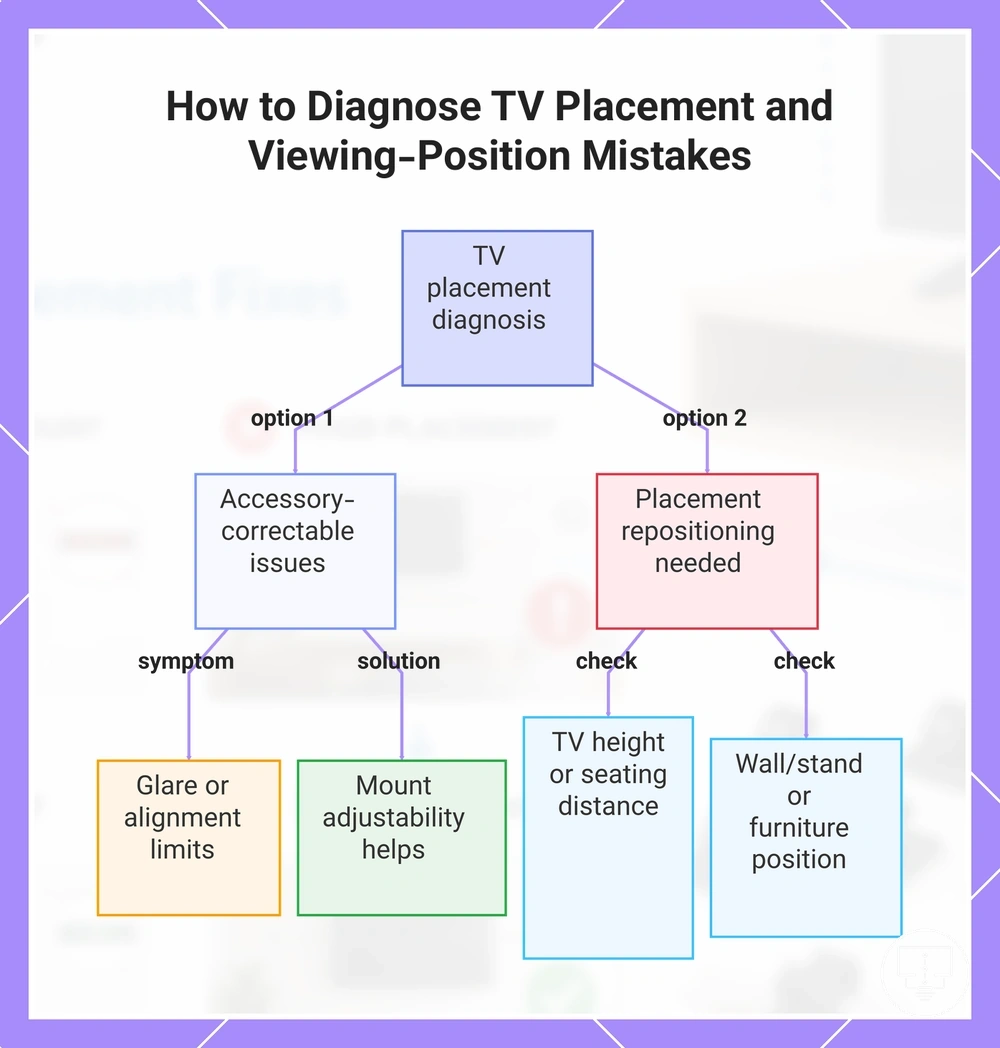
If the issue comes from screen angle, glare, or small alignment limits, the right accessory may help after the room conditions are checked. If the issue comes from a poor wall position, unsuitable stand position, or seating layout conflict, it may be better to reposition the setup before trying to choose the right accessories.
This chart shows how to separate accessory-correctable comfort issues from placement mistakes that require repositioning, based on common checks.
TV mounted too high or at a poor viewing angle
When a TV causes discomfort during normal viewing, excessive TV height or a poor viewing angle is often the setup problem. A screen that sits too high, too far from eye level, or outside a comfortable viewing position can contribute to glare, awkward viewing, and neck strain even when the TV works correctly.
Viewing comfort depends on TV height, eye level, seat distance, screen size, and the available viewing angle from the main seating position. Sunlight and reflection can affect visibility when the screen angle faces bright windows or room lighting. A tilt bracket or swivel mount may reduce discomfort when the mount, TV, and seating position allow enough adjustment, but the correction depends on available tilt range, swivel range, and room layout.
The checklist below helps verify whether TV mounted too high or at a poor viewing angle is causing the viewing problem.
- Check whether the center of the screen sits well above or below the primary eye level.
- Check whether seat distance makes the screen angle uncomfortable for extended viewing.
- Check whether glare comes from sunlight, reflection, or room lighting reaching the display surface.
- Check whether the mount allows enough tilt movement to improve the viewing angle.
- Check whether swivel movement can better align the screen with the main seating position.
- Check whether screen size and room position make repositioning more effective than adding another accessory.
Glare, sunlight, and awkward room positioning
When a TV looks difficult to watch despite working correctly, glare, sunlight, or awkward room positioning is often the setup problem. Bright reflections, a poor viewing angle, or an unsuitable seating path can reduce viewing comfort and create the local problem condition.
Viewing outcome depends on the relationship between the light source, screen angle, TV height, eye level, and seating position. Sunlight, lamp position, and reflection paths can make parts of the screen harder to see, while limited tilt or swivel movement may reduce adjustment options. A mount adjustment, stand repositioning, or lighting change may improve the outcome in some rooms, but the correction depends on window direction, screen reflection, and the available seating path.
The scenarios below help verify whether glare, sunlight, and awkward room positioning are affecting the viewing experience.
- Sunlight reaches the screen directly: a different screen angle, tilt adjustment, or seating position may reduce glare.
- A lamp creates a reflection on the display surface: changing lamp position or screen orientation may improve visibility.
- The viewing angle feels awkward from the main seat: swivel movement or repositioning may improve alignment.
- Stand placement forces off-center viewing: a different room position may improve comfort.
- Reflection remains visible from multiple seating positions: the outcome may depend on both light direction and room layout.
Power, stability, and control mistakes
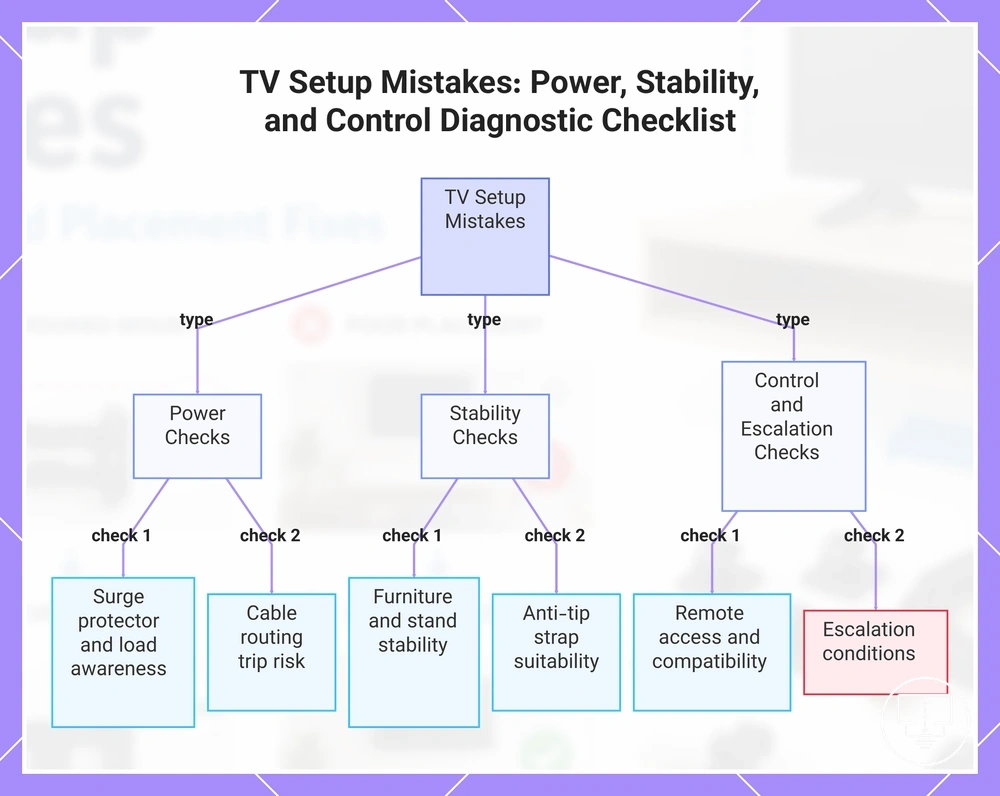
When a TV setup feels unreliable, unsafe, or difficult to use, the cause is often a power, stability, or control mistake rather than a fault with the TV itself. Problems involving power protection, TV stability, remote access, or load awareness can affect everyday use even when the screen and connected devices appear to work normally. The diagnostic goal is to separate accessory-correctable setup issues from conditions that require escalation.
This group of setup problems depends on power protection, surge protector use, power strip load, cable routing, stand support, and remote compatibility. Excess heat near a power strip, poor load awareness, cable trip risk, unstable furniture, or blocked remote access can create different symptoms that require different checks. An anti-tip strap may help reduce movement risk when the furniture and TV support it, while remote compatibility depends on device requirements, pairing methods, and control access. Electrical faults, damaged cords, unstable furniture, or persistent control problems should not be assumed to have an accessory-only correction.
The grouped checklist below helps diagnose power, stability, and control mistakes by verifying common safety and everyday-use conditions. Use the observations to connect symptoms with safe next actions and identify when escalation may be more appropriate than adding another accessory.
- Power: Check whether a surge protector is being used where power protection is needed.
- Power: Check whether the power strip shows load awareness concerns, heat, or overcrowded connections.
- Power: Check whether cable routing creates a trip risk near the power point, furniture, or walking path.
- Stability: Check whether TV stability is affected by furniture movement, stand positioning, or uneven support.
- Stability: Check whether an anti-tip strap is suitable for reducing movement risk in the current setup.
- Control: Check whether remote access is blocked by obstacles, cabinet placement, or poor device positioning.
- Control: Check whether remote compatibility, IR line of sight, pairing status, or device limits are contributing to the control problem.
- Escalation: Check whether damaged cords, unstable furniture, electrical concerns, or persistent remote failures require escalation rather than accessory changes.
This chart shows the main categories of TV setup mistakes and the key checks to identify accessory-correctable issues versus conditions requiring escalation.
Unprotected power points and overloaded power strips
Unprotected power points and overloaded power strips can create safety and reliability concerns in a TV setup. A TV power cord, connected devices, excessive load, heat, or poor outlet access can contribute to the local problem condition.
Power safety depends on surge protection, load awareness, cable condition, and outlet access. A surge protector may support power protection in suitable conditions, while a power strip and power board rating should still be considered alongside the number of connected devices. Damaged cords, excessive heat, overloaded connections, or uncertain electrical conditions should be treated as situations that may require escalation rather than an accessory-only correction.
The safety checklist below verifies surge protection, load, cable condition, and outlet access for unprotected power points and overloaded power strips.
- Check whether the TV power cord and connected devices use a suitable surge protector where power protection is needed.
- Check whether the power strip or power board rating appears appropriate for the connected-device load.
- Check whether the power strip shows signs of heat, overcrowding, or restricted access.
- Check whether cord damage, loose connections, or exposed cable sections are present.
- Check whether cable placement creates a tripping risk around the TV stand, furniture, or walking path.
- Check whether outlet access remains clear enough for routine safety checks and device access.
Unstable TV stands and tip-over risk
Unstable TV stands and tip-over risk should be treated as a safety correction, not a cosmetic setup issue. A TV stand can become unsafe when TV size, stand footprint, furniture depth, or movement risk creates the local problem condition.
TV stability depends on the TV base, furniture stability, traffic area, child or pet access, and anti-tip strap placement. An anti-tip strap may help reduce movement risk when the furniture, anchoring point, and TV support it, but a strap should not be used to compensate for unsuitable furniture, a damaged TV stand, or an unstable floor position. Any correction should start with a safety check before relying on accessory support.
The stability checklist below verifies whether unstable TV stands and tip-over risk need accessory support or a safer setup change.
- Check whether the TV size and stand footprint match the furniture depth and support area.
- Check whether the TV stand sits level without wobble, leaning, or uneven pressure.
- Check whether furniture stability changes when drawers, doors, or nearby objects are moved.
- Check whether child or pet access increases movement risk around the TV stand.
- Check whether the traffic area creates bumping, pulling, or cable snagging risk.
- Check whether anti-tip strap placement and anchoring are suitable for the TV and furniture.
- Check whether damaged furniture, weak support, or unstable placement needs escalation before adding a strap.
Lost, damaged, or mismatched remote control access
When a lost, damaged, or mismatched remote control prevents normal operation, the likely issue is a control-access problem rather than a TV display setup fault. The local problem condition is whether the remote can match the TV, reach the control sensor, pair correctly, and control the intended input or smart feature.
Remote control compatibility depends on remote type, TV brand support, IR line of sight, pairing method, batteries, button mapping, and device-control limits. A universal remote may support basic functions when the TV and remote are compatible, but it may not control every input, menu, streaming device, or smart feature. The safe correction limit is to verify the control path before treating the surge protector, power strip, anti-tip strap, TV stand, or display hardware as the cause.
The checklist below verifies lost, damaged, or mismatched remote control access by checking remote type, TV brand support, input control, and smart features before a replacement or correction is treated as suitable.
- Check whether the remote type is intended for the TV brand or connected device being controlled.
- Check whether the batteries are installed correctly and the remote responds during testing.
- Check whether IR line of sight is clear between the remote control and the TV sensor.
- Check whether the replacement remote requires pairing before input control, menu access, or smart-feature functions can operate.
- Check whether button mapping supports the functions you need instead of only basic controls.
- Check whether a streaming device, sound device, or set-top box has separate device-control limits.
- Check whether furniture depth, TV stand position, anti-tip strap placement, or movement risk affects access, visibility, or safety around the setup.
Correction checks before choosing TV setup accessories
Choosing TV setup accessories depends on matching the symptom to the cause before selecting a correction. A fit issue, safety concern, compatibility limitation, or setup error may require a different response even when the symptom appears similar. This section uses correction checks as a decision frame for identifying the right next step.
Start by verifying the TV model, port location, cable route, wall type, mount fit, room layout, power load, and remote support. A cable-management accessory may help when cable routing creates the setup problem, while a setup change may be more appropriate when furniture placement or viewing position is the cause. Use compatibility checks when the symptom may be linked to fit, connection, or device support.
The correction checks below help diagnose whether the symptom points toward an accessory, a setup change, or installation help. Use the symptom, cause, fit, safety, and compatibility signals together before choosing a correction priority.
| Check Area | What to Verify | Safe Next Action |
|---|---|---|
| TV model | Compatibility and fit requirements | Choose an accessory only if fit requirements appear suitable |
| Port location | Access to inputs and cable connections | Use an accessory when access is limited |
| Cable route | Cable strain, visibility, or obstruction | Consider cable-management accessories or a setup change |
| Wall type and mount fit | Mount compatibility and installation conditions | Seek installation help when fit or support is uncertain |
| Room layout | Viewing position and movement paths | Change the setup when placement causes the symptom |
| Power load | Power strip use, load distribution, heat, and tripping risk | Prioritize safety checks before adding accessories |
| Remote support | Control compatibility and feature access | Verify remote support before replacing accessories |
If the checks point to a missing function, access issue, routing problem, or compatibility gap, an accessory may help address the symptom. If the cause comes from placement, installation conditions, or room constraints, a setup change may be the better correction path. These decision signals can help you choose the right accessories without treating every setup problem as an accessory problem.
When accessories are not enough to fix the setup
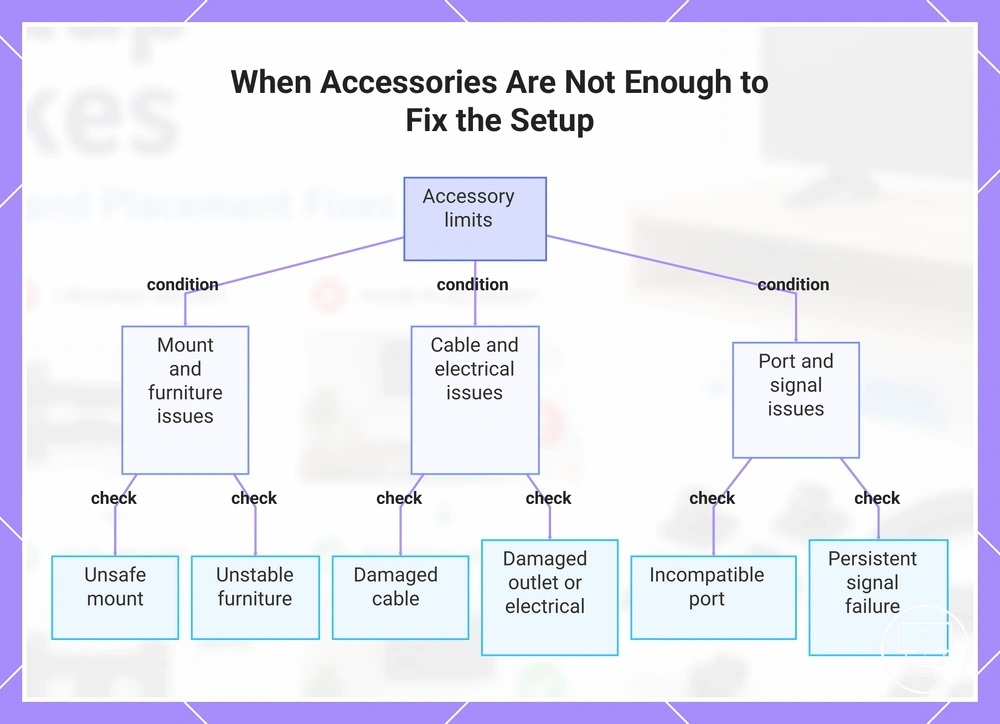
Accessories are not enough to fix the setup when the symptom points to an unsafe mount, damaged cable, electrical issue, incompatible port, unstable furniture, or another condition that an accessory cannot safely correct. In these cases, the decision frame is to recognize accessory limits before adding another part to the TV setup.
Some setup problems come from installation conditions, damage, compatibility limits, electrical issues, or room constraints rather than missing TV setup accessories. A cable cover may improve visible routing, but a damaged cable should not be treated as a cable-management problem. A spacer may improve access only when the wall mount, wall fixing, and TV fit are already suitable. The boundary is whether the accessory can address the cause without increasing safety risk or masking a deeper setup problem.
The checklist below helps identify when accessories are not enough to fix the setup and when the safe next step may require a setup change, repair assessment, or installation guidance.
- Unsafe mount: treat movement, poor fixing, or uncertain wall support as an installation concern before adding mounting accessories.
- Damaged cable: replace or assess the cable path instead of hiding damage with cable management accessories.
- Damaged outlet or electrical issue: stop using accessory-based fixes and seek appropriate electrical judgment.
- Incompatible port: verify the device requirement and port support before assuming an adapter can correct the problem.
- Unstable furniture: change the support condition when the TV stand, furniture depth, or movement risk creates instability.
- Persistent signal failure: check the cable, port, device, and settings before treating the symptom as a simple accessory gap.
- Blocked ventilation: change spacing or placement when the setup restricts airflow around the TV or connected device.
- Professional installation need: seek help when wall type, mount fit, power routing, or structural support is uncertain.
If the symptom remains after basic fit checks, compatibility checks, and safe setup adjustments, adding more accessories may create clutter without solving the cause. The safer next step is to separate accessory-correctable problems from conditions that need setup change, installation review, or professional help.
This chart shows the key conditions where adding accessories cannot safely correct the setup problem and a different approach is needed.